Marble Sort Level 6 Walkthrough & Solution
Marble Sort Level 6 walkthrough: dig out the trapped Purple cluster with a belt sacrifice, flip the Mystery Box ring, and clear the board step by step.
Levels · 6

Marble Sort Level 6 Walkthrough & Solution
Level 6 Board Overview: The Purple Famine

Level 6 is where the game stops being polite. The bottom Boxes open with a brutal demand: Purple, Purple, Purple, and one lonely Yellow on the far right. Now scan the Top Tray’s front row — Green, Orange, and two Yellows. Notice the problem? There is not a single Purple in reach.
The only Purple cluster on the board sits in the middle row of the Top Tray, sealed behind the front-row Orange. Around it, a U-shaped ring of dark Mystery Boxes hides the colors you will need for the midgame. Your colors overall are Purple, Yellow, Orange, and Green — but the stacking order works against you at every step.
This level teaches one lesson: sometimes you have to dump the wrong color on the Conveyor Belt on purpose to reach the right one.
The Trap in Marble Sort Level 6
Here is how the board is rigged:
- Column one: Purple Box on top, an Orange Box hiding under it.
- Column two: Same deal — Purple over Orange.
- Column three: Purple on top, Green buried below.
- Column four: Your only free win — a Yellow Box sitting on a Purple one.
Up top, the far-left Green block is pure bait. No Green Box is active, so tapping it early just parks dead weight on your belt. The two Yellow clusters on the right are your safe opening. The Orange in the middle is the gatekeeper standing between you and the Purple everyone wants.
Marble Sort Level 6 Step-by-Step Walkthrough
Opening: buy Purple with belt space
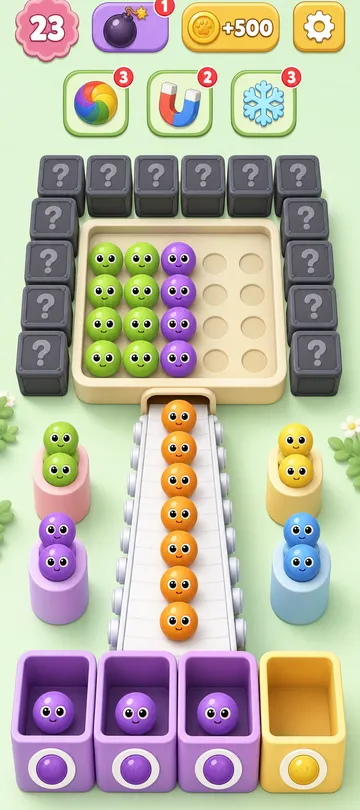
- Tap both Yellow clusters on the right side of the Top Tray. They drop straight into the column four Yellow Box.
- That clear raises a Purple Box in column four. Now all four active Boxes want Purple.
- Tap the front-row Orange cluster. It has nowhere to go — it drops onto the Conveyor Belt and sits there. Stay calm. This sacrifice is the whole plan.
- With the Orange out of the way, tap the exposed Purple cluster. It clears one of the waiting Purple Boxes.
- That clear raises the hidden Orange Box, and your parked Orange marbles fly home automatically. Belt is clean again.
Mid-game: flip the Mystery Box ring
- The opening combo rips the front line away and the U-shaped Mystery Boxes start flipping — expect more Purple, Orange, and the odd Yellow.
- Prioritize the remaining Purple Boxes. Every cleared column exposes deeper Green and Yellow layers.
- Once column three’s Green Box finally surfaces, tap the far-left Green block that has been sitting as bait all game. It has a home now.
- Match each new Mystery Box reveal to the rising second-layer Boxes immediately. Do not let the belt fill up while you hesitate.
Cleanup: play inside-out
- Check Box depth before every drop. If column four still has Yellow Boxes buried two deep, hold your top Yellows until they rise.
- Only gamble on a remaining Mystery Box when you have at least two free belt slots.
- Once every visible color has an open Box, sweep the leftovers in any order.

Level 6 Tips Recap
- Parking one wrong color on the belt can be the correct move — the Orange sacrifice pays you back instantly.
- The far-left Green stays untouched until column three’s Green Box is active. No exceptions.
- Buried Boxes cannot catch anything. Always check how deep a color’s Box is stacked before you drop.
Related Articles
blog
Marble Sort Mystery Box Guide: Reveal Before You Tap
Learn how the Marble Sort Mystery Box works: how it reveals its color as it moves forward, when it's safe to tap, and how to dodge the wrong-color trap.
blog
Marble Sort Video Walkthroughs — All Levels on YouTube
Every Marble Sort level 1-20 solved on video — the complete walkthrough series by Rock Gaming Channel, embedded level by level with links to the written guides.
level
Marble Sort Level 1 Walkthrough & Solution
Marble Sort Level 1 walkthrough: dodge the checkerboard bait, tap the front Yellow blockers first, and dig out the buried Light Blue clusters step by step.
Was this helpful?
Thanks for the feedback!