Marble Sort Level 156 Walkthrough & Solution
Marble Sort Level 156 walkthrough: clear Dark Blue, Purple, Dark Purple, and Light Gray boxes first, then ride the conveyor through the Green and Orange midgame.
Levels · 156
Levels 460–460
Levels 487–487
Levels 500–500
Levels 517–517
Levels 550–550

Marble Sort Level 156 Walkthrough & Solution
Level 156 Board Overview: Crate, Mystery Tile, and a Loaded Belt
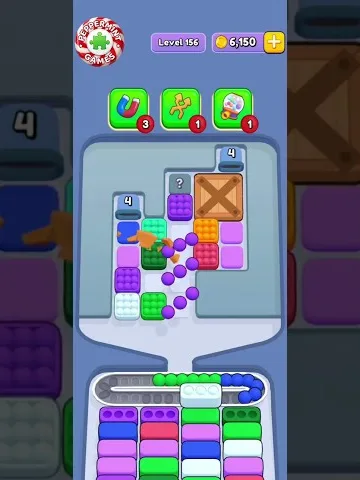
Level 156 opens with a tray that is hiding more than it shows. A wooden crate seals the top of the right column, a gray mystery ’?’ tile caps the middle column, and the left column leads with a starred Dark Blue tile. Behind and beneath those, the visible board holds Purple, White, Light Gray, Dark Purple, Light Green, Bright Green, Bright Yellow, Light Pink, and Bright Red tiles, with the lower-middle of the tray pinned under chain links.
The receiver boxes tell you the real plan. The opening row asks for Dark Blue, Purple, Dark Purple, and Light Gray — exactly the colors stacked in the left column and riding the front of the Conveyor Belt. The belt is already loaded with Green, White, Dark Blue, Purple, and Pink tiles, so it is going to push fresh colors at you before the first boxes clear.
By the midgame the target boxes have cycled hard: the front row now asks for Bright Green, Dark Purple, and Orange, while the tray is down to Dark Blue, Cyan, Dark Purple, Dark Green, Bright Green, and a lingering ’?’ tile. That shift — from the dark colors to the bright ones — is the whole arc of the level.
The Trap in Marble Sort Level 156
The opening board is set up to make you grab the wrong colors first. Here is the layout:
- The crate on the right column: it caps the column and hides whatever is behind it. The Bright Yellow, Light Pink, and Bright Red tiles beneath it are visible and tempting, but none of them have a receiver at the start.
- The mystery ’?’ tile: the gray question-mark tile in the middle column. Its reveal can change your reads, so do not plan your first moves around it — clear everything beneath it first and reveal it last.
- The starred Dark Blue tile: it opens the left column and looks special, but its color is ordinary Dark Blue. Feed it only when a Dark Blue box is in the front row, which it is at the start.
- The loaded Conveyor Belt: Green and White tiles lead the queue. They have no boxes on the opening board, so the belt will try to stuff them into your hand before you have anywhere to put them.
- Bait colors: Bright Yellow, Light Pink, Bright Red, and Light Green are all visible at the opening with zero receivers. Grab any of them and your belt jams before the first row clears.
The board wants you to chase the shiny tiles under the crate. Do that and the queue backs up. Instead, treat the right column as off-limits and play only the colors with open boxes.
Marble Sort Level 156 Step-by-Step Walkthrough
The level is a conveyor-management puzzle: the target colors rotate as boxes clear. Follow the release order.
Opening: clear the dark column

The first row of boxes asks for Dark Blue, Purple, Dark Purple, and Light Gray. Everything else on the board is bait.
- Tap the starred Dark Blue tile at the top of the left column into the Dark Blue box.
- Drop the Purple tile below it into a Purple receiver.
- Take the Dark Purple tile from the middle column into its box.
- Clear the Light Gray tile to finish the opening row of receivers.
- Keep feeding Dark Blue tiles from the Conveyor Belt — the queue holds several, and the Dark Blue boxes stay in rotation.
- Do not touch the Bright Yellow, Light Pink, or Bright Red tiles under the crate, and leave the Green and White tiles from the belt sitting until their boxes arrive.
- Save the mystery ’?’ tile for later. It caps its column, so clear what sits beneath it first.
Midgame: the boxes cycle to bright colors
Once the dark receivers fill, the front row flips to Bright Green, Dark Purple, and Orange. The belt has been feeding you the ingredients this whole time.
- Start releasing the Bright Green tiles from the queue — the mid-board shows a Dark Green and Bright Green pair forming, and a Bright Green box is waiting.
- Play the Orange tiles that arrive on the Conveyor Belt into the Orange box as they come.
- Reveal the mystery ’?’ tile now that its column is open, and fold its color into whichever receiver is active.
- Keep Dark Purple moving — a second Dark Purple box stays in the rotation for most of the level.
- Watch the Cyan tile sitting in the tray. Hold it until a Cyan receiver slides into the front row, then feed it along with the Cyan tiles arriving on the belt.
- Pair up the Dark Green and Bright Green columns as they stack — matching them frees the middle of the tray.
Cleanup: empty the belt
The tray is nearly stripped by now; the last colors — Dark Blue, Cyan, Dark Purple, Dark Green, Bright Green, and the tail of the queue — all have homes waiting.
- Only release a color whose receiver is in the front or second row. The yellows at the end of the queue feed the final boxes.
- Let the belt run itself out: match each arriving tile to its box before pulling anything new from the tray.
- The last clears pull the stragglers down on their own, and the level ends with the victory screen and its coin reward.

Level 156 Tips Recap
- Dark Blue, Purple, Dark Purple, and Light Gray are your only opening targets — everything else on the board is bait until the boxes cycle.
- Never start under the crate. Bright Yellow, Light Pink, and Bright Red have no receivers at the opening.
- Reveal the mystery ’?’ tile last. It caps its column and its color only matters once the midgame boxes arrive.
- Play the conveyor, not the tray: release the Green, Orange, and Yellow tiles as their boxes rotate into the front row.
Related Articles
blog
Marble Sort Mystery Box Guide: Reveal Before You Tap
Learn how the Marble Sort Mystery Box works: how it reveals its color as it moves forward, when it's safe to tap, and how to dodge the wrong-color trap.
blog
Marble Sort Video Walkthroughs — All Levels on YouTube
Every Marble Sort level 1-20 solved on video — the complete walkthrough series by Rock Gaming Channel, embedded level by level with links to the written guides.
level
Marble Sort Level 1 Walkthrough & Solution
Marble Sort Level 1 walkthrough: dodge the checkerboard bait, tap the front Yellow blockers first, and dig out the buried Light Blue clusters step by step.
Was this helpful?
Thanks for the feedback!