Marble Sort Level 550 Walkthrough & Solution
Marble Sort Level 550 walkthrough: numbered countdown tiles sit over the stacks, the queue opens with mixed colors, and the receivers cycle until the tray drains.
Levels · 550
Levels 460–460
Levels 487–487
Levels 500–500
Levels 517–517
Levels 550–550

Marble Sort Level 550 Walkthrough & Solution
Level 550 Board Overview: The Countdown Tray

Level 550 opens mid-solve, so the board already has momentum. The top of the tray holds four receiver columns plus two small corner units, and several tiles are already seated in them — the level starts with a partial head start rather than an empty grid. Below the receivers, the working stacks carry a wide spread of colors: light pink, white, light blue, dark pink, yellow, purple, textured brown, dark red, bright green, orange, and teal.
The centerpiece of the board is the numbered marker tiles. A green tile stamped “1” and an orange tile stamped “2” sit over the outer stacks, while two blue tiles stamped “3” ride the inner columns. Each marker counts down as you work it: a “3” tile takes three releases before it empties, and a marker that reaches zero becomes a spent stash that never releases anything again.
The conveyor below is already loaded. Blue, Yellow, Pink, and Dark Green ride the front of the queue, with a stream of Purple and Green feeding down from above, and the receivers rotate through more colors as the solve progresses. Nothing about the opening is a straight line: read the markers, match the active front row, and let the Boxes cycle toward the colors you free.
The Trap in Marble Sort Level 550
The board is rigged to make you commit before the receivers rotate. Here is the layout:
- Numbered marker tiles count down, not up: a “3” marker needs three separate releases to clear, so starting one commits you to finishing it. Crack it with no open Box and the whole run parks on the belt.
- The queue opens with mixed colors: Blue, Yellow, Pink, and Dark Green sit at the front of the belt, and the Purple-Green stream keeps feeding — several of those colors have no receiver in the opening row.
- The receivers cycle through many colors: the top Boxes rotate among Pink, White, Light Blue, Yellow, Purple, Orange, and more, so a color with a Box right now can be boxless twenty seconds later.
- Spent “0” markers are dead weight: by midgame one marker has already counted down to zero. It holds nothing, so never plan a combo around it.
Marble Sort Level 550 Step-by-Step Walkthrough
Work the markers down one release at a time. Follow the release order.
Opening: match the active receivers
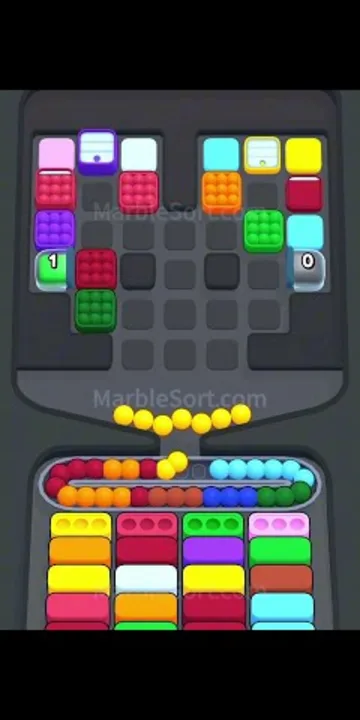
- Start with the colors whose receivers are already front and center — the upper columns show which requests are live, so match the visible tiles against them first.
- Work each numbered marker one release at a time; only start a “3” marker when its color has an open Box, because you are committing to three taps.
- Let the Purple and Green stream from above feed the tray — those colors ride in batches, so catch them while their receivers are showing.
- Do not chase the queue’s Yellow, Pink, or Dark Green if no matching Box is up; leave them riding the belt until the front row rotates.
Midgame: count the markers down
By the middle of the solve the tray has thinned to four columns and the queue runs Red, Orange, Yellow, Light Blue, Dark Blue, Green, Dark Red, and Brown. The numbered markers have ticked down — one already reads zero.
- Feed the queue in its batches: Red, Orange, Light Blue, and Dark Blue all cycle through, and a full matching batch finishes a Box in a single pass.
- Keep peeling each column one tile at a time; the colors buried beneath the markers are your real targets.
- Treat any marker still reading “2” or “3” as a commitment — finish what you start, because a half-emptied marker blocks its whole column.
- Ignore the spent “0” markers; they hold nothing and only occupy tray space until the column empties naturally.
- Prioritize columns that expose two matching tiles in a row — clearing them empties a column and opens the tray for the finish.
Cleanup: drain the last columns
The end frame shows the level complete: the tray towers are empty, a lone Blue block rides the track, and the “Level Completed!” banner appears with a +75 coin bonus. The finish is a straight drain.
- Every remaining tile is a single waiting for its Box to slide to the front — play only to the active front row.
- Let the queue cycle: the last Light Blues, Greens, and Browns feed as their Boxes open.
- Finish the final Boxes as the stragglers drop and let the tray empty. The level completes the moment the last tile lands.

Level 550 Tips Recap
- Read the numbered markers before you tap: a “3” tile takes three releases, so only start it when its color has an open Box.
- Only feed colors with an active receiver; the opening queue mixes Blue, Yellow, Pink, and Dark Green with no Boxes for several of them.
- Markers that have counted to zero are spent stashes — never wait on them.
- In the endgame the tray is nearly empty; cycle the queue and feed the last singles into their Boxes.
Related Articles
blog
Marble Sort Video Walkthroughs — All Levels on YouTube
Every Marble Sort level 1-20 solved on video — the complete walkthrough series by Rock Gaming Channel, embedded level by level with links to the written guides.
level
Marble Sort Level 1 Walkthrough & Solution
Marble Sort Level 1 walkthrough: dodge the checkerboard bait, tap the front Yellow blockers first, and dig out the buried Light Blue clusters step by step.
level
Marble Sort Level 10 Walkthrough: Tunnel & Pink Bait
Marble Sort Level 10 walkthrough: dodge the double Pink bait, tick the Tunnel countdown down from 3, and survive the Light Blue wall step by step.
Was this helpful?
Thanks for the feedback!