Marble Sort Level 204 Walkthrough & Solution
Marble Sort Level 204 walkthrough: feed Blue, Cyan, and Green first, let the numbered crates unwind, and hold Red and Orange until their Boxes rotate in.
Levels · 204
Levels 460–460
Levels 487–487
Levels 500–500
Levels 517–517
Levels 550–550

Marble Sort Level 204 Walkthrough & Solution
Board Overview
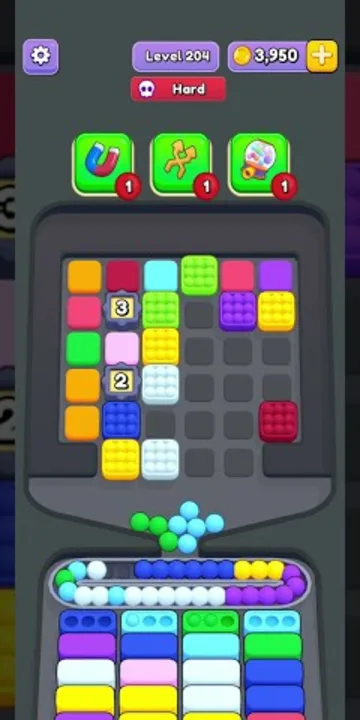
Level 204 opens with a top tray that is only half-armed: six columns carry marbles, and the left-center is sealed by a pair of numbered wooden crates. A [3] crate and a [2] crate sit stacked in the second column, with a Pink marble wedged between them and a Blue marble trapped underneath. Until those crates clear, that column is a dead zone for sorting.
The reachable colors are spread across the rest of the tray. The far-left column stacks Orange, Pink, Green, and more Orange; the third column holds Cyan, Green, Yellow, and White; and the right side carries Pink, Purple, and Red, with Purple and Red capping the top of the right edge. The fourth column holds a single Green marble.
The receiving boxes below ask for Blue, Cyan, and Green in the front row, with Purple, Pink, White, and Yellow cycling in behind. Notice what is missing: there is no Orange Box and no Red Box anywhere in the early rows.
The Trap in Marble Sort Level 204
The board dares you to clear the tallest stacks first. That is a trap:
- Orange bait: three Oranges cap the left column, but no Orange Box sits in the first rows. Feed them and the conveyor jams.
- Red bait: Red tops the second column and the far-right column. Same story — no early Red Box, so it parks on the belt with nowhere to go.
- The crate column: the [3] and [2] crates wall off the Pink between them and the Blue below. Do not force that column open early; play around it.
- Safe early colors: Blue, Cyan, and Green all have open Boxes in the front row, and Pink, White, and Yellow pick up homes as the second and third rows rotate in.
Marble Sort Level 204 Step-by-Step Walkthrough
Play only to the open boxes and the crates clear themselves. Here is the order.
Opening: feed the front row
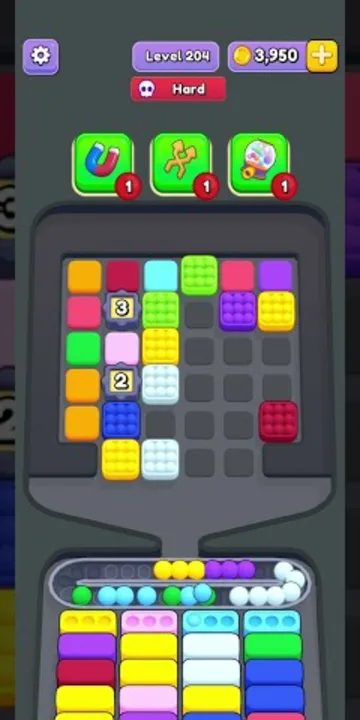
- Tap the Blue marble at the bottom of the crate column into the first Blue Box. It is safe — Blue has a front-row home.
- Feed Cyan from the third column into a Cyan Box; the front row wants two of them.
- Tap the Green marble in the fourth column into the Green Box.
- Keep Blue and Cyan flowing — the second row wants Blue and Cyan again.
- When a Pink Box reaches the front, start with the Pink in the fifth column.
- Ignore the Orange stack on the left and both Red marbles; they have no homes yet.
- Do not tap the crates directly — they count down on their own as boxes clear.
Midgame: the crates unwind
Once the early Blue, Cyan, and Green boxes cycle through, the left side finally opens up.
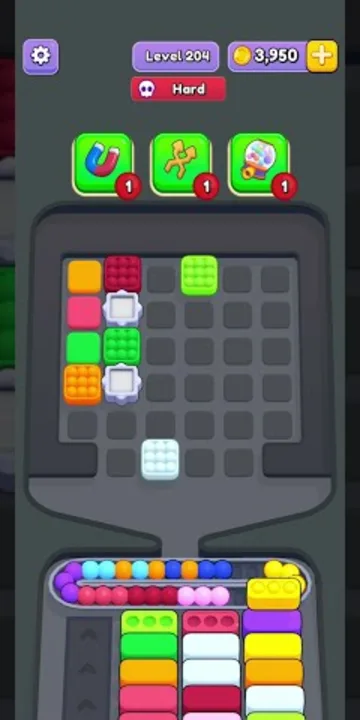
- The [3] and [2] crates vanish as the level progresses, freeing the Pink between them and the Blue underneath.
- Feed that released Pink and Blue immediately — their boxes are waiting in the middle rows.
- Now the Yellow boxes arrive; feed the Yellow in the third column and the Yellow on the right edge.
- When an Orange Box finally rotates in, release the Oranges from the left column in small batches.
- Same for Red — wait for the Red Box, then tap the Red marbles one at a time.
Cleanup: drain the rest
- Work the remaining White and Purple marbles into their boxes as they come to the front.
- Play only to the active front row from here; the queue does the rest.
- Let the last stragglers ride down on their own — the tray is nearly empty by this point.
Level 204 Tips Recap
- Orange and Red have no Boxes early — never feed them first.
- The numbered crates clear by themselves; sort around them instead of forcing the column.
- Blue, Cyan, and Green own the front row and are your safest opening taps.
- In the late game, only tap a color whose Box is in the front or second row.
Related Articles
blog
Marble Sort Video Walkthroughs — All Levels on YouTube
Every Marble Sort level 1-20 solved on video — the complete walkthrough series by Rock Gaming Channel, embedded level by level with links to the written guides.
level
Marble Sort Level 1 Walkthrough & Solution
Marble Sort Level 1 walkthrough: dodge the checkerboard bait, tap the front Yellow blockers first, and dig out the buried Light Blue clusters step by step.
level
Marble Sort Level 10 Walkthrough: Tunnel & Pink Bait
Marble Sort Level 10 walkthrough: dodge the double Pink bait, tick the Tunnel countdown down from 3, and survive the Light Blue wall step by step.
Was this helpful?
Thanks for the feedback!