Marble Sort Level 207 Walkthrough & Solution
Marble Sort Level 207 walkthrough: dodge the numbered lock tiles, feed only the colors with open receivers, and work the Hard tray down column by column.
Levels · 207
Levels 460–460
Levels 487–487
Levels 500–500
Levels 517–517
Levels 550–550

Marble Sort Level 207 Walkthrough & Solution
Level 207 Board Overview: The Locked Tile Tray
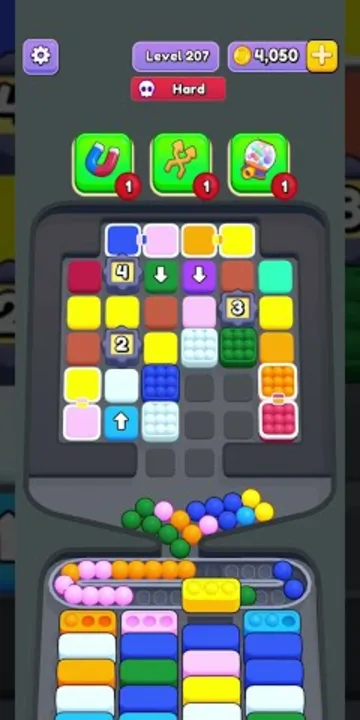
Level 207 opens as a Hard board built on a compact tile tray instead of a classic bottle layout. Six columns of colored tiles stand over a row of receiver boxes, and the whole thing is sealed up by lock tiles: numbered white markers labeled 2, 3, and 4 sit planted inside the stacks, splitting several columns into separate sections. You cannot treat any column as a single clean drop — each lock tiles off a chunk of the tray.
The receivers that matter first ask for Pink, Orange, Yellow, and Blue. Those four colors have homes waiting at the bottom, and they make up a healthy share of the visible columns. Everything else you can see at the start — Red, Teal, Green, Purple — is either waiting for a Box that has not cycled forward yet or riding below a lock tile where you cannot safely reach it.
Two special tiles stand out near the top of the grid: a Green tile and a Purple tile carrying white down-arrow markers. They hint at how the tray shifts once tiles start moving, and they sit above some of the most useful early drops. Treat the opening like a selective feeding puzzle: play the open receivers, ignore the locked columns, and let the tray open up on its own.
The Trap in Marble Sort Level 207
The Hard difficulty comes from the lock tiles and the color mix, not from tray size. Here is the layout:
- Numbered lock tiles split the columns: white markers labeled 2, 3, and 4 block sections of the grid, and a couple of them hide behind colored tiles so you only see them mid-solve. A column is never fully open until its locks clear.
- Only four colors have receivers at the start: Pink, Orange, Yellow, and Blue. Red, Teal, Green, and Purple are visible early, but feeding them jams the tray before the opening Boxes clear.
- Arrow-marked tiles are the exceptions: the Green and Purple tiles carrying down-arrows sit high in the grid and are the only way to start moving the top layers, so plan your first taps around them.
- The queue feeds fast: a waiting tray of tiles is already loaded at the start. Tapping a queued color whose receiver is not open yet is the fastest way to stall a promising run.
Marble Sort Level 207 Step-by-Step Walkthrough
The solve is about reading the locks before you commit. Follow the release order.
Opening: feed the four open colors
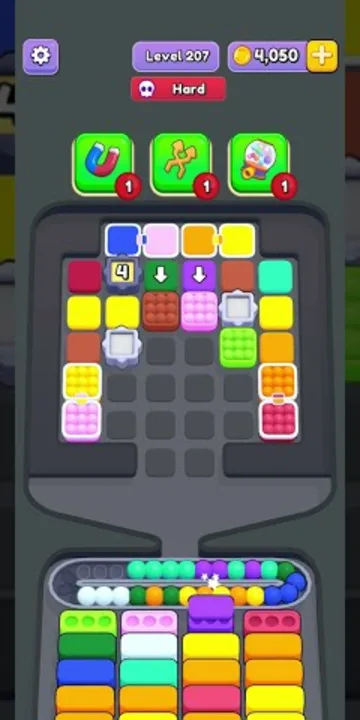
- Tap the Pink tile at the top of the first column — Pink has an open receiver, and it sits above a stack you will want to peel anyway.
- Follow with the Yellow and Orange tiles underneath it in the same column, dropping each into its Box as the front row cycles.
- Move to the right side and feed the Yellow, Orange, and Red run in the last column the same way, stopping the moment a tile has no matching receiver.
- Tap the Blue tile in the second column into the Blue Box. The column behind it is lock-sealed, so take the one safe tile and leave the rest.
- Keep the queue moving with Pink, Orange, Yellow, and Blue only. The Green and Purple arrow-marked tiles stay in the grid — their receivers are not open yet.
- Do not touch the tiles under or behind any numbered lock until the lower Boxes clear. Locked columns are dead weight early.
Midgame: let the tray thin out
By the middle of the solve the grid has lost most of its height: the top rows are cleared, the middle columns are down to a few tiles each, and the open receivers have cycled toward the colors that were waiting. The locks are still in place, but the tray now has empty slots to work with.
- Clear the columns that have no locks first — each one frees an empty column you can use for staging.
- Peel the stack in the second column down to its lock tile, dropping every reachable match before the lock forces you to stop.
- Feed the arrow-marked Green and Purple tiles the moment their receivers open; the arrows mean they move further than a normal tile, so they clear extra space.
- Watch for the waiting queue to deliver Gray, Light Green, Cyan, and Purple in batches — only tap a batch when its color has a Box in the front row.
- Work the remaining locked columns one tile at a time, always checking the front row before you commit a drop.
Cleanup: strip the last columns
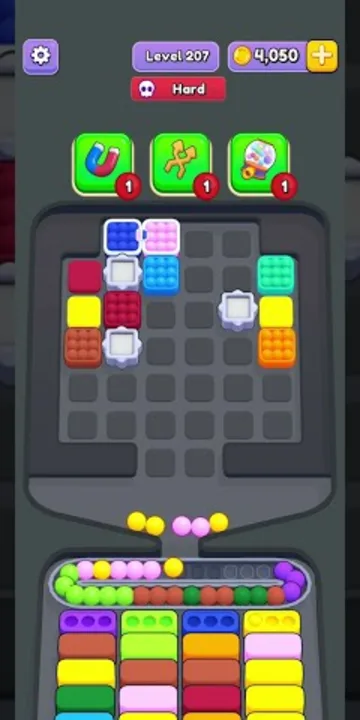
The end frame shows the tray nearly empty: just a few single tiles scattered across the grid, the locked blocks still sitting in the second and fourth columns, and the last of the queue still feeding. The level finishes as a straight drain.
- Play only to the active front row. The remaining Red, Yellow, and Teal singles in the first and last columns drop as their Boxes slide forward.
- Leave the locked blocks alone — they are obstacles, not targets, and they clear once the tray empties around them.
- Cycle the queue: Green, Pink, Yellow, and Orange arrive in runs at the end, and each run finishes a Box in one pass.
- Let the final singles fall into the last open receivers and empty the tray to complete the level.
Level 207 Tips Recap
- Only Pink, Orange, Yellow, and Blue have open receivers at the start — feed those and ignore Red, Teal, Green, and Purple until the Boxes cycle.
- Numbered lock tiles split the columns into sections: never commit to a drop you cannot see past a lock.
- The arrow-marked Green and Purple tiles clear extra space, so save them for when their receivers open.
- In the endgame the grid is nearly empty — just cycle the queue and feed the last singles into the front row.
Related Articles
blog
Marble Sort Dispensers & Locks Guide: Key Order
Learn how Dispensers and Locks work in Marble Sort: find the hidden Key, use Pop-It and Numbered Dispensers without clogging the belt, and beat Level 805.
blog
Marble Sort Locked Pallet Guide: Key Queue Timing
Master the Locked Pallet in Marble Sort: how the key queue works, why keys ignore color, and the timing tricks that stop locked boxes from stalling your run.
blog
Marble Sort Video Walkthroughs — All Levels on YouTube
Every Marble Sort level 1-20 solved on video — the complete walkthrough series by Rock Gaming Channel, embedded level by level with links to the written guides.
Was this helpful?
Thanks for the feedback!